A broader benefits menu isn’t automatically a better one. To understand how to choose an employee benefits platform for a small business, focus on benefits your team can use, administration that stays manageable, and a straightforward way for employees to access support. The right platform should make your offer clearer, not more complicated.
When weighing up features, admin tools and mobile access, it can be hard to know which details matter most. Start with how well each feature fits your team, then consider how easily you can explain and manage it.
An employee benefits platform brings together benefits, employee access and administration. When comparing options, look at the tools behind the offer as well as the mobile experience employees use. This guide explains what to assess, from wellbeing support and staff rewards to benefit administration, so you can choose useful features without adding complexity for its own sake.
Key Takeaways
- Choose benefits that match your team’s needs, then weigh their cost against the value employees can actually use.
- Keep the offer easy to understand: a focused selection is more useful than a long menu people struggle to navigate.
- Assess whether administration tools can simplify enrolment, communication and day-to-day benefits management.
- Look for a mobile experience that makes benefits easy to find and use, including wellbeing support and rewards.
What Is An Employee Benefits Platform?
An employee benefits platform brings benefits, access and administration together in one digital place. Depending on the platform, it may include staff discounts, wellbeing support, an Employee Assistance Programme (EAP), recognition schemes, pension tools, holiday management, staff surveys and HR communications. Some platforms also manage health insurance schemes or integrate with payroll. The platform provides the access and administration layer; the employer chooses which benefits to offer.
Compare costs with the features your team is likely to use, not the length of the feature list. Consider the platform fee, any setup or administration charges, and the time your team spends managing benefits. Then assess value using practical indicators such as employee participation, feedback and reduced manual administration. A business seeking wellbeing support across several areas may value a broader offer more than a discounts-only option. Cost-effectiveness depends on fit and use, not price alone.
UK tax and National Insurance treatment depends on the benefit and how it’s provided. Before launch, identify the payroll reporting and tax treatment for each benefit, including any salary sacrifice arrangement.
Assess privacy controls, access permissions, data retention, encryption and incident response. Ask how employee information is handled and protected, and whether the platform’s documented practices align with UK data protection requirements.
UK small businesses can choose platforms focused on staff discounts, wellbeing, recognition, pensions or holiday management. Others combine functions such as an EAP, surveys, HR communications and payroll integration. Compare these categories with your actual benefits offer and administration needs.
With salary sacrifice, an employee agrees to exchange part of their contractual cash salary for a non-cash benefit. This can affect salary-linked calculations and take-home pay, so explain the terms clearly and assess affordability before implementation.
Before buying, ask vendors which features are included, what the quoted fee covers, how payroll integration works and what employee data the platform handles. Also ask how staff access benefits and how administrators manage changes. Clear answers make feature and cost comparisons more meaningful.
Avoiding an overcomplicated benefits offer
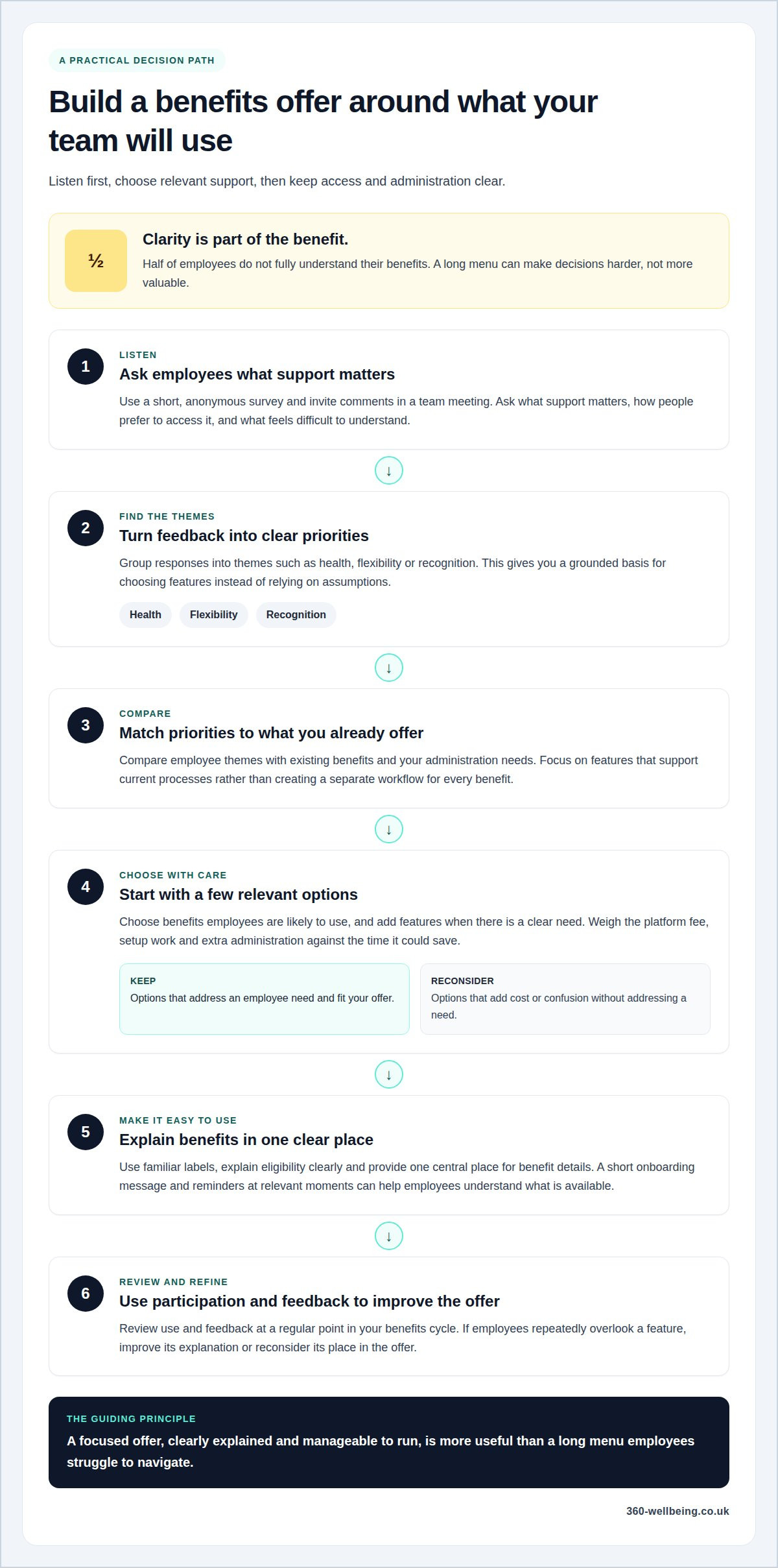
A long benefits menu can make decisions harder, not more valuable. Half of employees do not fully understand their benefits, so clarity should shape the offer from the start. Begin with a few relevant options, explain them in plain language, and add features when employees show a clear need. A team seeking practical wellbeing support, for example, may value it more than a catalogue of unrelated perks.
To understand employee needs, use a short, anonymous survey and invite comments in a team meeting. Ask which support matters, how employees prefer to access it and what currently feels difficult to understand. Group responses into themes, such as health, flexibility or recognition, then compare them with the benefits already available. This gives you a grounded basis for choosing features instead of relying on assumptions.
Keep the employee experience simple. Use familiar labels, explain eligibility clearly and provide one central place to find benefit details. A short onboarding message, followed by reminders at relevant moments, can help employees understand what’s available. Explain how to access a benefit when someone joins, rather than relying on a dense handbook alone.
For small UK employers, drawbacks can include platform fees, setup work, extra administration and features employees rarely use. A platform may also add complexity if payroll, enrolment or communications require separate manual processes. Compare the effort involved in managing the offer with the time it could save. Remove options that add cost or confusion without addressing an employee need.
Review use and feedback at a regular point in your benefits cycle. If employees repeatedly overlook a feature, improve its explanation or reconsider its place in the offer. A focused workplace wellbeing option may fit better than adding several unrelated benefits, especially when staff feedback points to wellbeing as a priority.
Platform features and benefits administration
Administration tools help employers organise benefits and give employees a clear way to access them. The right combination depends on your offer, payroll process and team’s day-to-day needs.
Benefits Administration Features
Benefits administration features help employers manage enrolment, eligibility, communications and employee access in one platform. Clear records and straightforward processes can reduce manual follow-up for a small HR team.
Look for tools that match your actual tasks. An administrator, for example, may need to update employee details, share benefit information, manage holiday entitlement or review survey feedback. Staff surveys and HR communication tools can also highlight questions that need clearer answers. Choose features that support current processes rather than creating a separate workflow for every benefit.
Payroll and HR Software Integration
Payroll and HR integration connects platform information with the systems used to manage employee records and pay. Integrating a benefits platform with payroll can reduce repeated data entry when enrolment or benefit details change.
An employee’s eligibility or selected benefit, for example, may need to be reflected in payroll records. Find out which information passes between systems, how administrators handle changes and what tasks remain manual. A connected process can make routine updates easier, while mismatched records can create extra work. Map a common change, such as a new starter enrolling, to see how the systems support it.
Benefits Available Through a Platform
Platforms can bring together different employee benefits, from staff discounts and recognition schemes to wellbeing support and Employee Assistance Programmes. Some also include pension management tools, holiday administration or health insurance scheme management.
Choose categories that reflect employee needs and your organisation’s existing offer. A business prioritising wellbeing might consider support alongside staff discounts, while another may value pension or holiday tools. A platform can also combine surveys and HR communications with benefits, helping employees find information in one place. Review the purpose of each feature before adding it to the offer.
A practical way to choose an employee benefits platform for a small business is to map the benefits you plan to administer against your existing systems. Compare each platform’s administration, payroll integration and employee-facing features with that map. Questions about how to choose an employee benefits platform for a small business become easier to answer when you assess a real process, such as updating a new starter’s records. Prioritise tools that support those processes and avoid administrative steps without a clear purpose.
Benefits platforms and mobile apps
A mobile app can put benefit information within reach, but its value depends on how easily employees can use it. Assess the employee experience alongside the platform’s administration tools, especially if staff work across different locations or schedules. A useful app makes information easy to find rather than adding another place employees have to search.
Test a common employee task on a phone, such as finding eligibility details or instructions for accessing a benefit. Check that labels are clear, pages are readable and employees can understand what to do next. Consider how the experience works for people who prefer a browser or have limited confidence with apps. Mobile access should support different working patterns, not become the only route.
Communication matters as much as the interface. Employees may need to see a benefits message three to five times before they act. Yet 46% say they receive no benefits information or only learn about benefits when joining their company, while only 23% say their employer talks to them about benefits. A platform can help present information, but your communication plan gives employees a reason to return.
During a demonstration, assess practical details such as:
- How quickly an employee can find a benefit and understand its next step.
- Whether the app and browser show consistent information.
- How administrators publish updates and communicate changes.
- Whether the design remains clear on a smaller screen.
Map one employee journey, from receiving a message to finding and using a benefit. Note any confusing labels, extra steps or information gaps. This simple test lets you compare platforms through a real task rather than an attractive presentation. Choose mobile access that makes the offer easier to understand and keeps essential guidance close at hand.
If digital access is part of your wellbeing priorities, explore employee wellbeing support as one way to shape a more connected benefits experience.
360 Wellbeing: 24/7 Virtual GP
360 Wellbeing brings together a 24/7 Virtual GP and wider support for employee wellbeing. It may suit small businesses looking to make healthcare and wellbeing benefits part of a clear, accessible offer.
Employees can access Mental Health Support, Physiotherapy and 360 Rewards alongside the Virtual GP. These options cover different aspects of wellbeing, from support with physical health to mental health and everyday rewards. For an employer, the practical next step is to consider which of these areas best complements the benefits already available to the team.
If you’re reviewing platforms and want to explore wellbeing support for your employees, contact 360 Wellbeing to discuss your needs.
Build a benefits offer that can grow with your team
Your benefits platform should support your current team and leave room to adapt as your business changes. Choosing an employee benefits platform for a small business means looking beyond setup: consider how the offer can evolve, how employees will find support and whether the experience will remain clear as new needs emerge.
360 Wellbeing can support this approach with a 24/7 Virtual GP, Mental Health Support and 360 Rewards. These options bring together different aspects of employee wellbeing, giving you a starting point for considering what could complement your existing offer. Keep the next step practical: discuss the needs you want your benefits to address and explore how the available support could fit your team.
Contact 360 Wellbeing to discuss your needs. A thoughtful benefits decision can help you build a more supportive workplace, one that develops alongside your people.
Frequently Asked Questions
How much do UK employee benefits platforms cost for small businesses?
Costs depend on the platform’s charging model and the benefits or administration features included. Some charge per employee, while others may use a fixed fee or separate charges for setup and support. Compare the full cost with the features your business will use, and ask for a clear breakdown of recurring and one-off charges before deciding. Don’t compare headline fees without checking what each includes.
Which employee benefits platform features should small businesses compare?
Compare features with the tasks your business needs to manage, not just the size of each platform’s menu. Check whether administrators can update employee records, manage eligibility and share benefit details. Consider reporting, payroll connections and staff access too. A useful comparison also covers how employees find help, whether by phone or browser, and how easily your team can communicate changes.
How easy is it to set up and manage a benefits platform for a small business?
Prepare employee details, choose the benefits to include and assign clear responsibility for updates to make setup easier. Map a typical event, such as a new starter joining, to understand which steps your team handles and which the platform handles. After launch, set aside time to review enrolments, answer employee questions and keep benefit information current. The workload depends on your offer and processes.