Benefits communication can’t rely on a single email or onboarding pack. Communicating employee benefits to a remote workforce works best when information is easy to find, shared through several channels and repeated over time, with remote and on-site employees included.
Benefits can be hard to keep visible when people work in different places and on different schedules. A clear, consistent approach helps employees understand what’s available, where to find details and how to get support. This article explains how to communicate benefits effectively, use digital platforms as information hubs and make enrolment and tailored messages accessible to teams wherever they work. It also offers practical ways to combine updates, conversations and in-person touchpoints so benefits feel relevant and easier to use.
Key Takeaways
- Use a mix of email, video and social channels to make benefit updates easier for remote employees to see and understand.
- Make a benefits platform a clear information hub, with key details and support easy to find.
- Design enrolment around employees’ locations and needs so participation is accessible across the workforce.
- Tailor messages for remote and on-site teams, and build in opportunities for employees to ask questions and share feedback.
1. What Are the Factors that Influence Benefits Communication?
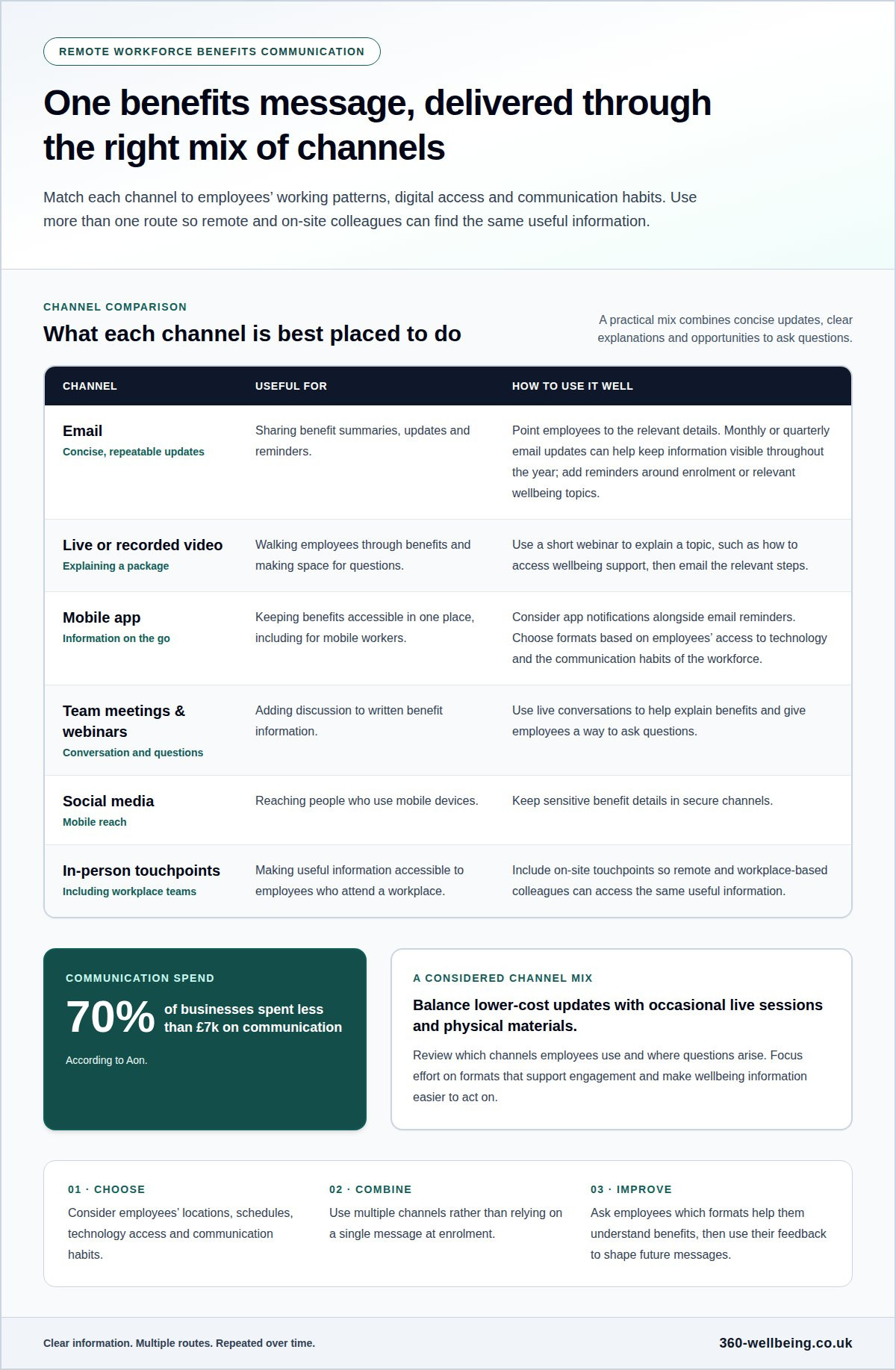
Communication works best when it reflects employees’ locations, schedules and access to technology. Email can share concise benefit summaries, while live or recorded video can explain a package and give employees space to ask questions. Social media may reach people using mobile devices, but keep sensitive benefit details in secure channels.
Use more than one channel. A mobile app can keep benefits accessible in one place, while email reminders point employees to updates. Team meetings and live webinars add conversation to written information. For example, use a short webinar to explain how to access wellbeing support, then email the relevant steps. Include an in-person touchpoint for employees who attend a workplace, so remote and on-site colleagues can access the same useful information.
Choose channels based on employees’ working patterns, digital access and communication habits. A desk-based employee may check email regularly, while a mobile worker may notice an app notification sooner. Ask employees which formats help them understand their benefits, then use their feedback to shape future messages and improve engagement.
For UK employers, give employees clear information about the benefits and terms that apply. Choose accessible formats suited to the scheme and workforce, and provide a way to ask questions. The best channel may vary, but clarity about the package is essential.
There’s no reminder frequency that suits every team. Share benefit updates regularly rather than relying on one message at enrolment. Monthly or quarterly email updates can keep information visible throughout the year, with extra reminders timed around enrolment or relevant wellbeing topics.
Budget also shapes the communication mix. According to Aon, 70% of businesses spent less than £7k on communication. A considered plan can combine lower-cost email and app updates with occasional live sessions and physical materials. Review which channels employees use and where questions arise, then focus effort on formats that support engagement and make wellbeing information easier to act on.
2. Employee benefits platforms as information hubs
A benefits platform gives remote and on-site employees one place to find relevant information. Instead of searching old emails or asking a manager for a document, employees can open a portal and review available benefits. This is especially useful when teams work different hours or rarely share a workplace.
Organise the platform around employee tasks. A clear home page can point people to benefit summaries, eligibility details, enrolment steps and support contacts. Use plain labels such as “health support” or “financial wellbeing”, and make each section easy to scan on a mobile screen. Employees can view benefits information through an app without disclosing personal information to their employer.
HR software and a benefits platform serve related but distinct purposes. HR software may hold employment records and workplace processes, while a benefits portal explains what’s available and how to use it. If employees need to switch systems, provide a simple route from the HR home page to benefits information and explain where each task belongs.
Use the platform to keep updates and community information together. An online benefits platform can share workplace news, explain changes and give employees a consistent place to return. This matters when 74% of employees believe they’re missing important company information. A short announcement can point to a fuller explanation, while a searchable help area addresses common questions.
Total Rewards Statements can show employees which benefits they receive, which they could receive and what those benefits are worth. Presenting that information together can help people understand the whole package, rather than viewing each benefit in isolation. Review the platform when employees raise a recurring challenge, then improve the relevant page or signposting. Where employees need confidential personal support, provide a clear route to an Employee Assistance Programme.
3. Making benefits enrolment accessible across locations
Make enrolment practical for employees wherever they live and work. A remote employee may not be able to use a gym near the main office. Where the benefit allows a choice, let employees select a local gym, childcare provider or healthcare provider that suits their location. Clear eligibility details help people understand their options before making a selection.
Make the route from announcement to enrolment straightforward. Link directly to a mobile-friendly selection page instead of asking employees to search through emails. Use plain labels, readable text and simple steps. Explain what information employees need, how to save a selection and where to get help if they have difficulty using the page.
In the UK, digital benefits communications should work for employees with different needs and devices, and personal data should be handled securely. Keep sensitive details, such as health information, out of general messages. Explain what information an enrolment form requests and who can access it, so employees can make informed selections.
Awareness is part of access. Promote enrolment through a short message, a manager discussion and a reminder directing employees to the relevant information. Offer flexible formats, such as a mobile page for a travelling employee and a printed guide for someone who cannot readily use the online process. Keep benefit terms consistent across formats.
To assess understanding and use, review enrolment patterns and the questions employees raise. Many visits to a page alongside few completed selections may point to unclear instructions or a difficult process. Ask employees for feedback after enrolment, then improve the messages or steps causing confusion. Treat usage as a reason to investigate, not proof that every employee understands the benefit.
Compare access across work locations and arrangements while protecting individual privacy. If employees repeatedly ask how to find local healthcare options, add a clear example to the enrolment guidance. If mobile users struggle to complete a selection, simplify the page and test the revised steps on a phone before sharing them widely.
4. Communicating benefits to remote and on-site workforces
A strong strategy gives remote and on-site employees the same core information through channels that suit each group. Share a concise digital update, then use team meetings or a physical noticeboard to reach people working on site. Keep the key message consistent so location doesn’t determine who understands the offering or how to access it.
Communicating employee benefits to a remote workforce works best with regular, useful contact. According to Drewberry’s Employee Benefits & Workplace Satisfaction Survey, 46% of employees received no benefits communication or information only once, or when joining their company. Plan recurring updates, and give employees a clear route to ask questions. Managers can also listen for concerns during check-ins, then pass common themes to the people responsible for benefits communications.
Tailor the examples, not the essential facts. A remote employee might need to know how to access support from home; an on-site colleague may need details during a shift. Use a brief survey to learn which formats employees prefer and which benefits they find confusing. Adapt timing and delivery for different teams while keeping eligibility and access information clear for everyone.
Explain pensions, salary sacrifice and taxable benefits in plain English, using the terms and figures that apply to each scheme. Set out what the benefit is, how employees access it and where to find details about its treatment in payroll. Separate confirmed scheme information from general explanations, and provide a clear contact route for questions about an individual payslip. This gives remote staff the same practical guidance as office-based colleagues.
Review the approach using employee questions, survey responses and engagement with benefit information. If employees repeatedly ask how a benefit affects their pay, make that explanation easier to find in the next update. For a more joined-up approach to workforce wellbeing, strengthen your benefits communication strategy with clear, relevant support messages.
360 Wellbeing: Employee Assistance Programme (EAP)
360 Wellbeing brings employee support into a benefits package through its Employee Assistance Programme (EAP) and related wellbeing offerings. It can be a natural next step when your communications plan needs clear, accessible ways to explain the support available to remote and on-site employees.
Alongside the EAP, 360 Wellbeing offers a 24/7 Virtual GP, Mental Health Support and 360 Rewards. These options cover different aspects of wellbeing, helping employers present a broader picture of support rather than focusing on one type of benefit. Clear messages can help employees understand what is available and where each offering fits.
For organisations reviewing their benefits communication, 360 Wellbeing can help connect wellbeing support with a wider employee benefits approach. Contact 360 Wellbeing to discuss your team’s needs.
Make benefits communication an ongoing conversation
Consider the experience employees should have after first hearing about a benefit. Can they find guidance, understand their options and feel comfortable asking for help? Use these moments to shape a thoughtful communication approach, with clear language and a welcoming route to support. Communicating employee benefits to a remote workforce is about more than sending information; it’s about helping people feel included in the support available to them, wherever they work.
For organisations looking to connect employee wellbeing with practical benefits, 360 Wellbeing offers a 24/7 Virtual GP, Mental Health Support and 360 Rewards. These offerings can form part of a wider conversation about how employees access support and what matters to them. A clear next step can help turn communication into a more connected employee experience.
Contact 360 Wellbeing to discuss benefits and consider how your approach can support employees across your workforce. Small, considered improvements can help make benefits easier to understand and engage with.
Frequently Asked Questions
What Are the Factors that Influence Benefits Communication?
Employee needs, work patterns, digital access and the complexity of each benefit all shape communication. A shift worker may need information outside standard meeting times, while a new starter may need a plain-language explanation of eligibility. Consider whether employees can ask questions privately. Their feedback can reveal whether messages are clear and whether the next update should explain a particular term or process.
What Is Necessary to Develop a Benefits Communication Plan?
A practical plan sets out its purpose, intended audiences, key messages, communication owners and review process. Map important moments, such as joining, enrolment and benefit changes, then decide what employees need to know at each point. Assign someone to keep information current and gather questions from managers or employees. A short review after each campaign can identify wording or timing that needs improvement.
Why does communication breakdown?
Communication often breaks down when information is scattered, overly technical or sent without a clear next step. An employee may hear about a benefit but not know whether they’re eligible or where to find its terms. Conflicting explanations from different teams can add to the confusion. Keep one approved source of information, use consistent wording and give employees a clear route to ask follow-up questions.
Which digital channels are most effective for sharing benefits information with a distributed workforce?
The right channel mix depends on how employees work. Email can deliver a concise update, an employee portal can hold detailed guidance, and a live video session can explain a complex change. Use a secure channel for personal information, not an open social post. For example, send a brief email linking to the relevant portal page, then offer a session where employees can ask general questions.
What are common mistakes and risks when communicating benefits to remote employees?
Common mistakes include relying on one announcement, using unexplained jargon, leaving outdated details online and assuming every employee can use the same format. These gaps can lead to missed enrolment steps or uncertainty about eligibility. Avoid sharing personal details in group messages, and don’t imply that a benefit covers situations excluded by its terms. Review content when benefits change, and provide an accessible alternative when digital access is difficult.