The strongest benefits message is one employees can access, understand and act on. An effective employee benefits rollout communication plan reflects your organisation’s culture, workforce structure, demographics and working patterns, then delivers clear guidance through the channels people use.
A single email or annual meeting may seem simplest, but employees work different shifts and settings, and have different levels of access to digital tools. Benefits communication works better when the format suits the workforce and key messages are reinforced instead of left to compete for attention.
This guide explains what shapes communication choices and how to create clear, memorable messages employees can use when making enrolment decisions. Learn how to tailor content without fragmenting it, plan communications throughout the year and combine digital channels with face-to-face conversations so support stays visible beyond enrolment.
Key Takeaways
- Shape communications around how employees work, so people across roles and locations can find and understand their options.
- Make each enrolment message easy to scan, memorable and clear about the next step.
- Use a wellbeing calendar to organise timely reminders and keep benefits visible beyond enrolment.
- Match each message to the right platform, combining digital touchpoints with opportunities for direct conversation.
1. What Are the Factors that Influence Benefits Communication?
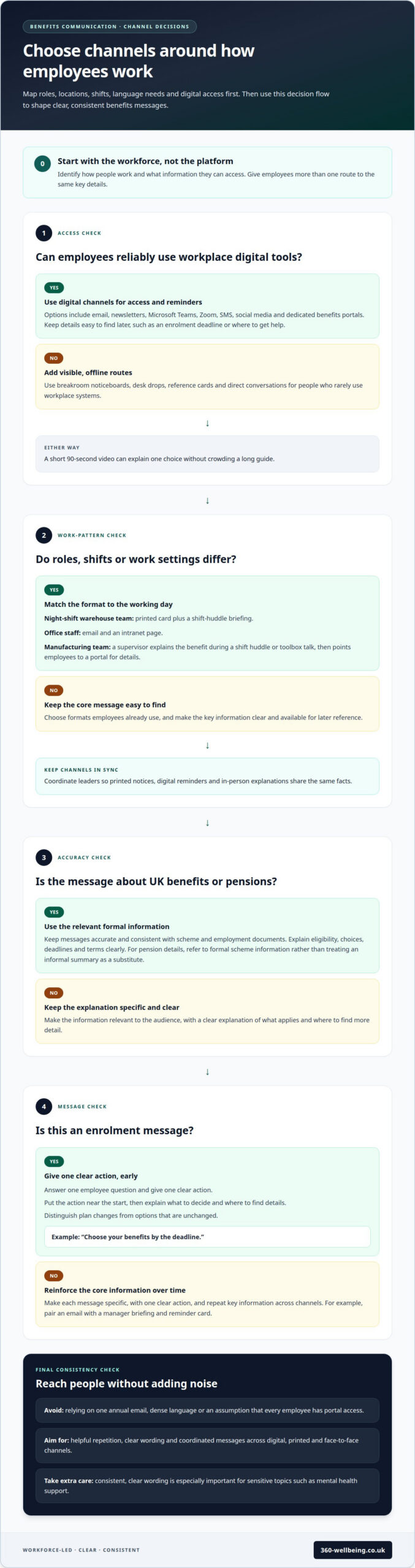
A useful strategy starts with the workforce, not the platform. Map roles, work locations, shifts, language needs and digital access before choosing formats. For example, a night-shift warehouse team may need a printed card and shift-huddle briefing, while office staff may prefer email and an intranet page.
Give employees more than one route to the same information. Email, newsletters, Microsoft Teams, Zoom, SMS, social media and dedicated benefits portals can support digital and on-demand access. Keep key details easy to find later, such as an enrolment deadline or where to get help. A short 90-second video can explain one choice without crowding a long guide.
Digital tools work best alongside in-person communication. Use breakroom noticeboards, desk drops, reference cards and conversations to reach people who rarely use workplace systems. In manufacturing, for example, a supervisor can explain a benefit during a shift huddle or toolbox talk, then direct employees to a portal for further details.
For UK benefits and pensions, keep messages accurate and consistent with the relevant scheme and employment documents. Explain eligibility, choices, deadlines and terms clearly. For pension details, refer to formal scheme information rather than treating an informal summary as a substitute.
Common mistakes include relying on one annual email, using dense language and assuming every employee has portal access. These gaps can leave people unclear about their choices or next steps. Make each message specific, with one clear action, then reinforce the core information across channels over time. For example, pair an email with a manager briefing and reminder card.
Repetition should be helpful, not noisy. Coordinate leaders so printed notices, digital reminders and in-person explanations share the same facts. Consistency is especially important for sensitive topics such as mental health support, where clear wording helps employees understand how to find help.
2. Memorable and clickable open-enrolment messages
Make every enrolment message answer one employee question and give one clear action. “Choose your benefits by the deadline” is more useful than a general announcement. Put the action near the start, then explain what employees need to decide and where to find details. Distinguish plan changes from unchanged options so returning employees can quickly see what matters.
Personalise messages around relevant needs, not assumptions about individuals. A new starter may need a straightforward overview of available support, while someone starting a family may value information about benefits suited to changing circumstances. Segment messages by role, life event or eligibility where appropriate, while keeping the underlying facts consistent. This helps people across diverse teams recognise what applies to them.
Visual cues make information easier to scan. Use recognisable icons for physical health, mental wellbeing and financial support, alongside short headings and brief explanations. A reference card might identify the benefit, who can use it and the next action. Keep colours and labels consistent across emails, portal pages and printed materials so employees recognise related information.
For mental health and wellbeing communications, use calm, direct language. Explain what support is available, how to access it and what employees can expect, without implying that everyone has the same needs. Clear information can make a sensitive subject easier to approach. Link relevant messages to wellbeing support information where employees can take the next step.
Measure awareness, engagement and enrolment separately. Use a short survey or poll to find out whether employees understand their options; review email clicks and portal activity to assess engagement; then compare those signals with enrolment records. Together, these measures indicate whether a message was seen, understood and acted on. Use the findings to improve future communications rather than treating a click as proof of understanding.
Reinforce the central message in different formats over time. The 10x10x10 rule suggests repeating a message ten times in ten different ways, aiming to help people retain ten per cent. Treat it as a prompt for varied, coordinated reminders, not a guarantee of employee engagement.
3. What Is Necessary to Develop a Benefits Communication Plan?
Build the calendar around the benefits year, then plan content in four-week intervals. This creates room to adjust language as workforce priorities change while allowing time for review. Choose a quarterly or annual planning horizon that suits the organisation. Record each campaign’s audience, source information, key message, channels and owner. Include the action employees need to take so leaders know what requires approval.
Treat communication as a year-round process, not a burst before enrolment. Include milestones for new starters, departures, out-of-cycle plan changes and changes in employees’ circumstances. A welcome message, for example, can introduce relevant benefits, while a plan-change notice explains what is different and what to do next. Schedule reminders around the actual enrolment window and leave time for follow-up questions.
Use quarterly themes to keep education focused. One quarter might introduce available health support; another can explain how to access it in plain language with a practical example. A health and wellbeing communications calendar can also include observance days or seasonal priorities. Create reusable content, such as a concise guide or portal page, instead of rebuilding every message from scratch.
Set a weekly rhythm for timely reminders, such as sharing a wellbeing resource on Wellbeing Wednesday. Keep each update brief and link it to the wider campaign rather than treating every post as a separate promotion. This helps workplace channels reinforce the same message without overwhelming employees. Give each calendar item a clear owner, publication date and next action.
Before publishing, consider operational peaks, shift patterns and enrolment deadlines. Schedule an early explanation, a reminder during the window and a final prompt before it closes, adjusting the sequence to the scheme’s dates. December communications can confirm enrolment and preview the new plan year. After each campaign, review employee questions and benefit take-up, then refine the next quarter’s topics, timing and language.
4. Communicating benefits across multiple platforms
A strong communication strategy connects one reliable source of information with the channels employees already use. Keep eligibility, key dates and next steps consistent, whether someone reads a portal page or hears a briefing. Give each channel a clear role: one explains the decision, another reminds employees to act, and another helps answer follow-up questions.
Use a central, maintained page as the reference for current programme details. Messages on other platforms can summarise the relevant choice and direct employees to that source. This reduces the risk of an old printed notice or forwarded email competing with updated information. Assign an owner to review changes and keep shared details aligned.
Plan touchpoints as a connected sequence, not separate announcements. An email can introduce a change, a manager conversation can explain its effect, and an on-demand page can provide details employees may need later. Include an in-person touchpoint so employees have space to raise questions a message alone may not resolve.
Adapt the format without changing the meaning. A short staff-platform message can highlight one action, while a longer guide explains choices and terms. A printed reference can help employees who need information away from a screen. For mental health and other sensitive programmes, use discreet, respectful wording and make the route to support clear.
Review engagement across channels to develop better communication over time. Look at page visits, questions raised in briefings and feedback from employees, then compare those insights with the actions the message intended to prompt. If people keep asking where to begin, improve the signposting. If a platform gets little response, reconsider its timing or format. Use the findings to make the next sequence more useful, not simply louder. Plan a connected benefits communication approach that helps employees find relevant support.
360 Wellbeing: Employee Assistance Programme (EAP)
360 Wellbeing offers an Employee Assistance Programme (EAP) as part of its employee benefits support. For organisations looking to make wellbeing resources easier to communicate, the EAP can sit within a broader benefits picture that includes Mental Health Support, a 24/7 Virtual GP and 360 Rewards.
Clear communication helps employees understand which support is available and how it fits into their choices. Explain each option in plain language, signpost it through familiar channels and make details easy to revisit. This makes wellbeing support a practical part of the benefits conversation, rather than an announcement employees see only during enrolment.
If you’re considering employee wellbeing support for your organisation, contact 360 Wellbeing to discuss the options.
Build a benefits conversation that continues
Make your communication plan a living part of how employees experience support, not just an enrolment campaign. Choose one upcoming employee question and shape a useful message around it. Then note where people pause, what they ask and which route helps them act. These observations can guide the next update and help leaders keep the experience human.
An employee benefits rollout communication plan can connect everyday messages with the support employees may need, including a 24/7 Virtual GP, Mental Health Support and 360 Rewards. Clear signposting helps people understand what’s available and where to begin, while keeping each message focused on a practical next step.
If you’re considering how these options could support your workforce, contact 360 Wellbeing for support. A thoughtful next step can help make employee wellbeing easier to understand and access.
Frequently Asked Questions
What Are the Factors that Influence Benefits Communication?
Benefits communication depends on how complex the choices are, how often they change and who needs to act. A change affecting only eligible staff needs different targeting from one that applies across the organisation. Consider access to workplace information, employees’ familiarity with benefit terms and whether they need to make an active choice. These factors determine how much explanation each message needs.
What Is Necessary to Develop a Benefits Communication Plan?
A workable plan needs agreed information, clear ownership and a way to learn from employee responses. Record who approves scheme details, who prepares messages and who handles questions. Set out how to correct outdated information, for example by updating the central reference page before issuing a revised notice. This gives employees and managers a consistent place to find clarification.
What should an employee benefits rollout communication plan include?
Include the rollout’s purpose, who is eligible, what is changing, what employees need to decide and how to take the relevant action. Add the effective date, any key deadline and a contact route for questions. For example, a message announcing a new option should distinguish the choice from the steps needed to select it, so employees can act confidently.
What are the key steps and timeline for launching employee benefits?
Start by confirming benefit details and identifying the employees affected. Prepare the core explanation and review it with those responsible for the scheme, then send an initial announcement before the enrolment window. During enrolment, share reminders and address recurring questions. After it closes, confirm next steps and review feedback. Set dates around the organisation’s actual scheme arrangements, not a generic timetable.
How should employers segment messages for different employee groups?
Segment messages using relevant differences, such as eligibility, job role, location, work pattern or stage of employment. A new starter may need an introduction, while an employee affected by a plan change needs a precise explanation of what is different. Keep essential facts consistent across versions, and avoid using personal assumptions as substitutes for eligibility information or employees’ stated needs.
Which communication channels work best for explaining employee benefits?
The most useful channels depend on where employees can access information and what each message needs to achieve. Use email or a staff platform for a prompt, a central page for detailed reference and a conversation for questions that need explanation. Printed materials can serve as easy-to-keep reminders. Give every channel the same core facts and direct employees to the appropriate next action.