A new benefit can be genuinely useful and still go untouched if employees don’t know what it offers or how to access it. Learning how to get employees excited about new benefits means making the support feel relevant, clear and easy to use, not simply sending an announcement and hoping it lands.
A launch can get lost among daily tasks and competing workplace messages. Employees may also be unsure whether a service is right for them or feel hesitant about using support for their health, finances or personal wellbeing. Clear, thoughtful communication can replace uncertainty with confidence while giving people space to explore what suits them.
This guide sets out a practical launch plan: explain benefits through relatable examples, reach people across different roles and working patterns, make access instructions straightforward, and use feedback to refine your approach. The aim is to introduce benefits as meaningful support, not just another item in the inbox.
Key Takeaways
- To get employees excited about new benefits, first identify whether the gap is awareness, understanding, relevance or access.
- Use voluntary feedback and workforce context to shape messages for different roles and working patterns.
- Choose communication channels based on who they reach, how accessible they are and whether employees can ask questions.
- Follow a clear launch sequence, then give employees time to explore the offer before reviewing engagement.
- Explain 360 Wellbeing’s unlimited access to UK-registered GPs by phone, video or text with a specific, useful example.
How to get employees excited about new benefits starts with understanding the engagement gap
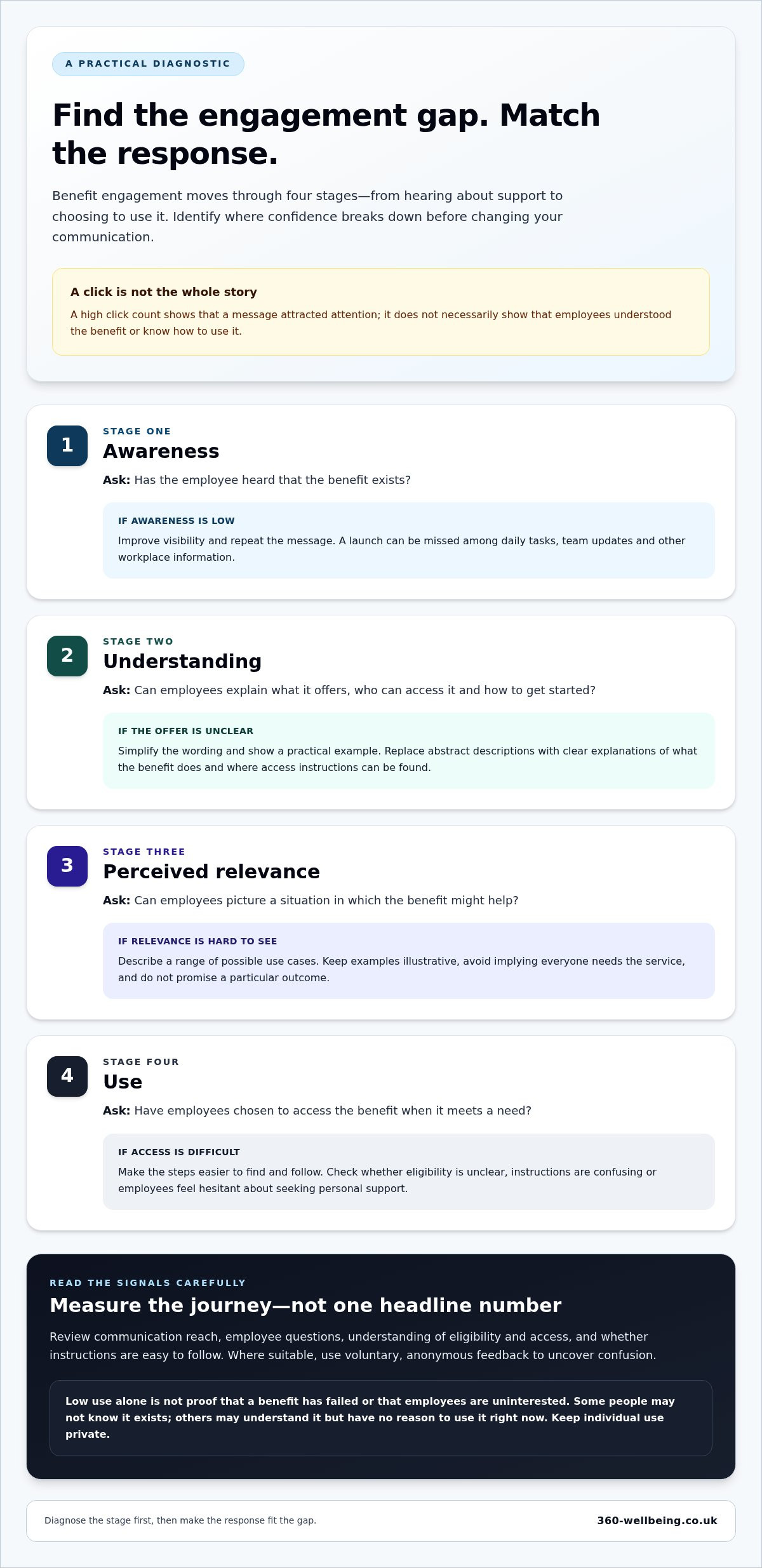
To understand how to get employees excited about new benefits, look beyond whether an announcement was opened or clicked. Excitement is better understood as informed interest: employees can recognise support that may be useful to them and know where to find access instructions. A high click count shows that a message attracted attention, but not necessarily that people understood the benefit or could use it.
Diagnose the gap before changing your communication. Consider four stages:
- Awareness: Has the employee heard that the benefit exists?
- Understanding: Can they explain what it offers, who can access it and how to get started?
- Perceived relevance: Can they picture a situation in which it might help?
- Use: Have they chosen to access it when it meets a need?
Each stage points to a different response. If awareness is low, improve visibility and repeat the message. If employees have heard of the benefit but can’t explain it, simplify the wording and show a practical example. If they understand it but don’t see its relevance, describe a range of possible use cases without implying that everyone needs the service. If access is difficult, make the steps easier to find and follow.
Why a benefits announcement may not create engagement
A launch message competes with daily tasks, team updates and other workplace information. Employees who are busy or don’t regularly use workplace email may miss it. Even when they see a message, abstract descriptions and unfamiliar terms can leave them unsure what the benefit actually does. For example, “financial support” is less informative than explaining that employees can access debt advice through a helpline.
Low use doesn’t always mean the benefit has failed. Some employees may not know it exists, while others understand the offer but have no reason to use it right now. Unclear eligibility, confusing access instructions or discomfort about seeking personal support can also create friction. Treat these as distinct possibilities, not proof that employees aren’t interested.
What meaningful employee excitement looks like
Meaningful engagement is visible when employees can identify support that could be relevant and know where to go for details or access. This contributes to broader employee engagement, but benefits communication should remain an invitation, not a request for personal disclosure. People should be able to learn about wellbeing support without explaining why they might need it.
Measure the journey rather than relying on one headline number. Review communication reach, the questions employees ask, how well they understand eligibility and access, and whether the instructions are easy to follow. Where appropriate, use voluntary, anonymous feedback to uncover confusion. Keep individual use private and don’t treat low uptake on its own as a verdict: not everyone needs the benefit at the same time.
Understand employee needs before choosing how to introduce new benefits
A useful launch begins with listening, not guessing. Before deciding which messages to send or which channels to use, find out what employees already understand, what feels relevant and where they expect to need guidance. This helps you shape communication around real questions instead of assumptions about age, job title or personal circumstances.
Gather useful insight without asking intrusive questions
Use a short, voluntary pulse survey, small listening sessions or themes from feedback you already receive. Keep questions focused on the benefit and the experience of accessing it, not on private health or financial details. For example, ask: “Which part of this offer is unclear?” or “What would make the first steps easier to find?” Make anonymous feedback possible where suitable, and involve people across roles, shifts, remote arrangements and levels of access to workplace email.
Turn employee needs into clear benefit messages
Translate what you learn into concise explanations that connect each benefit with a practical question it may help answer. Avoid suggesting that everyone needs or should use every service. The aim is to make the offer easier to understand, not to label employees or predict what they are going through.
- Virtual GP: Explain that employees can access UK-registered GPs by phone, video or text, and show where to find the access instructions.
- Mental health support: Describe the support in plain language, with a clear explanation of who can access it and any relevant limits.
- Financial support: Explain the kinds of questions the service can help with, such as accessing debt advice, without implying a particular outcome. A financial support for employees guide can help you develop this explanation in more detail.
- Legal support: Give a simple example of when an employee might want to learn more, then explain how to access the relevant support.
Use a repeatable message map for every benefit: what it is, who may find it useful, how access begins, and what eligibility or limits apply. Everyday scenarios make an offer more tangible, but keep them illustrative. For instance, say that financial support may be relevant to someone looking for guidance on a money concern, rather than promising to resolve it. Make sure each example accurately reflects the benefit’s terms and access steps.
Then adapt delivery to practical context. Staff who work away from a desk may need a printed notice or manager briefing; people who work remotely may rely more on digital information. Keep the core explanation consistent while varying the format and reminder route. This is a practical foundation for how to get employees excited about new benefits: match relevant information to employees’ working lives and give each person room to decide what matters to them.
For example, 360 Wellbeing’s employee support offer is easier to explain through clear service examples and straightforward access guidance than through a long list of features without context.
Choose benefit communications employees will notice, understand and trust
The right channel depends on what employees need to know and how they work. A manager briefing makes space for questions, while an email gives people something to revisit. An intranet page can hold fuller details, but it may be less visible to staff who rarely use a desk or workplace systems. Printed notices can reach employees on site, though they have limited space for explaining access. A webinar can demonstrate steps and answer common questions, but it won’t suit every shift or schedule.
Use a mix of channels where needed, with one dependable source for full details. Keep the core facts consistent across every format, including what the benefit offers, eligibility, limits and how to access it. Adapt the length and examples, not the terms. If a manager’s explanation conflicts with the written guidance, trust can quickly erode.
Match the communication format to the employee question
A short overview helps build awareness; a demonstration or FAQ is more useful when employees want to know how to get started. Make digital guidance easy to read on a mobile device, and pair it with printed notices or briefings for employees who aren’t regularly online. For sensitive health and wellbeing questions, explain how to raise them privately rather than asking people to discuss personal circumstances in a group.
Consider the purpose and trade-offs of each channel before choosing:
- Manager briefings: Useful for discussion and team-specific context, provided managers have accurate guidance and know where to direct detailed questions.
- Email: Easy to distribute and revisit, but can be overlooked. Use a clear subject line and make the main action easy to spot.
- Intranet: A place to store fuller information, FAQs and access steps. Make the page easy to find from familiar workplace links.
- Webinars: Helpful for walking through an offer and responding to questions. Share a written summary so the information is available to people who can’t attend.
- Printed workplace notices: Can reach employees who don’t regularly check email. Use them to signpost a clear next step, not to squeeze in every detail.
Make the message human, specific and easy to act on
Lead with an everyday need, not a catalogue of features. Write in plain English, use short sentences and make the next step specific. Employees should be able to tell what the benefit may help with, who can access it and where to find the full instructions.
A concise launch message could read: “Looking for support with a health question? You can access [benefit details]. To learn how to get started, visit [access instructions]. Review the information privately and decide whether the service is right for you.” Replace the bracketed text with the approved details, and make sure the wording matches the benefit’s terms before sending.
For example, 360 Wellbeing’s employee support brings a broad offer together in a way that can be introduced through clear, employee-friendly explanations.
Launch new benefits with a simple plan and keep learning from employees
A considered rollout gives employees more than one chance to understand a benefit and find out how to use it. It also gives your organisation time to spot unclear guidance before it becomes a barrier. A straightforward sequence helps you plan each stage, keep messages consistent and learn from responses without expecting instant uptake.
Build a launch sequence employees can follow
Plan the practical details before announcing the benefit. Then move through each stage in order, so employees and managers know what to expect:
- Prepare: Create an accurate summary covering what the benefit offers, eligibility, relevant limits and access steps. Check that links and instructions work, and prepare answers to likely questions.
- Brief managers: Give managers the same core information and concise talking points. Explain where to direct questions they can’t answer, especially those involving sensitive personal circumstances.
- Announce: Introduce the benefit in plain English. Lead with what it may help with, who can access it and where to find the full details.
- Demonstrate access: Follow the announcement with a practical walkthrough, FAQ or question-and-answer session. Show the route to access without asking anyone to share personal information.
- Remind: Use a small number of useful follow-ups, such as a reminder in an employee bulletin or a link in onboarding materials. Vary the format or example for different working patterns, while keeping the facts unchanged.
- Review: Give employees time to read, ask questions and decide whether the benefit is relevant before assessing the initial response.
Review engagement and adapt the rollout
Look at different signals separately rather than treating one figure as the full picture. Message delivery or page visits can indicate reach, while questions may reveal whether key details are unclear. Where reporting is available, access activity can show whether employees are reaching the service. Feedback helps explain what the numbers don’t: employees may have found the instructions useful but not needed the benefit yet.
Keep the review focused on improving the experience. Ask whether employees could find the eligibility details, understood the first access step and knew where to go with questions. If the same point causes confusion, simplify the wording or make the instructions easier to locate. Don’t infer an individual’s health, financial position or other personal circumstances from benefit use. Review only information that’s appropriate to your organisation’s reporting and keep individual support private.
Record the questions raised, communication formats used and changes made. That simple record can inform future onboarding and benefits communications, so the next introduction starts with clearer guidance. This feedback loop is a practical part of how to get employees excited about new benefits: make the offer easier to understand and access, then improve the launch based on what employees tell you.
360 Wellbeing brings employee support services together with practical access guidance.
Show employees how 360 Wellbeing makes new benefits practical to use
A broad wellbeing offer is easier to understand when employees can connect each service with an everyday question. 360 Wellbeing brings together health, mental health, lifestyle, financial and legal support. Rather than presenting a long list of features, introduce the types of help available, explain who can access them and make the first steps easy to find. Employees can then decide what may be relevant without feeling that they should use every service.
Explain the offer through relevant employee use cases
Keep examples practical and balanced. An employee with a health question can access UK-registered GPs on demand, 24/7, by phone, video or text, with unlimited use. Someone looking for emotional support can explore therapy sessions or 1-2-1 life coaching. The offer also includes personalised virtual physiotherapy, menopause support from specialist doctors, and a digital gym with scheduled classes and personalised workouts. Employees with money or legal questions can use the 24/7 debt and legal helplines, or access complimentary will writing and career guidance.
Be clear about limits as well as possibilities. The main account holder can access up to 8 therapy sessions per condition per calendar year. Don’t imply that family members have the same structured counselling allowance or that any service will produce a particular personal outcome. Family members residing at the same address can access all services except structured counselling, so explain that condition clearly when describing family access.
The offer also includes 1,000+ brand discounts. Employees need to register with third-party partners to access them, so include that step in your explanation. Fuel discount cards are available for Shell, Esso and BP, with a maximum of three physical cards. Specific details help staff understand what a benefit involves and what they may need to do next.
Make activation instructions part of the launch
Make the welcome email part of the launch communication. Employees receive a unique six-digit token in that email, and each token can be used once only. Explain that they need to follow the activation instructions in the welcome email and keep the token available while completing those steps. Don’t suggest that a token can be reused or provide an alternative activation route.
Tell employees that they can access the service through the mobile app or the progressive web app at app.360wellbeing.com on a desktop or laptop. A simple walkthrough can show where to find the welcome email, how to follow its activation instructions and where to explore the support available. Keep the guidance factual and let people review it privately, particularly when the benefit relates to health, finances or legal matters.
This is the practical heart of how to get employees excited about new benefits: connect services to real questions, explain access plainly and leave employees free to decide what suits them. Explore 360 Wellbeing as you plan a clear, thoughtful introduction for your team.
Make benefits part of an ongoing conversation
A thoughtful launch doesn’t have to be perfect on day one. Treat it as the beginning of a continuing conversation: notice where employees still have questions, make guidance easier to find and revisit your messages as team needs and working patterns change. Small, considered improvements can help support feel more familiar and approachable over time.
If you’re considering how to get employees excited about new benefits, start with a clear next step: explore an offer that brings different kinds of employee support together, then plan how you’ll introduce it in language your team can understand. Explore 360 Wellbeing and see how its employee support could fit your team.
With clear information and a welcoming approach, you can help employees feel confident exploring the support available to them.
Frequently Asked Questions
How often should employers communicate about new employee benefits?
Communicate at launch, then revisit the benefit at useful points rather than relying on a single announcement. For example, share a reminder after employees have had time to read the information, include it in onboarding materials and resurface it alongside a relevant workplace update. The right rhythm depends on your workforce and the benefit. Keep each message useful, and avoid sending reminders so often that employees tune them out.
Should a company introduce all new benefits at once or in stages?
Introduce benefits in stages if employees need time to understand several offers or their access steps differ. A staged rollout lets you focus each message, answer questions and adjust guidance before moving on. If the benefits are straightforward and closely related, a single introduction may be simpler, provided employees can easily distinguish what each one offers. Consider your workforce’s capacity to absorb information, not just the organisation’s preferred launch date.
Can employers make benefit communications accessible to remote and deskless employees?
Yes. Provide key information in formats employees can reach during their working day, such as mobile-friendly pages, printed notices, team briefings or a shared digital document. Remote staff may benefit from a pinned intranet page or follow-up email, while deskless employees may need a noticeboard or a manager to point them to the details. Make sure every format gives the same core information and a clear route to the full guidance.
How can managers talk about wellbeing benefits without pressuring employees to use them?
Describe the benefit as an option, not an expectation, and avoid asking staff to explain whether they need it. Managers can say, “This support is available if it would be useful. Here’s where you can read about it privately.” They should answer general questions using approved information, then direct personal or sensitive queries to the appropriate confidential route. Don’t track individual interest or treat non-use as a sign that someone is disengaged.
What should an employee benefits launch email include?
Include a clear subject line, a short explanation of what’s changing, who can access the benefit, when it becomes available and the next action employees should take. Link to a full source of information that covers eligibility, limits, access instructions and answers to common questions. State who can help with general queries and how to raise sensitive questions privately. Keep the email focused, then make it easy to save or revisit.
How can a small employer build interest in new benefits with limited HR time?
Use a repeatable launch template rather than creating every message from scratch. Prepare one accurate summary, a short manager briefing and a small set of common questions, then reuse them across email, onboarding and team updates. Ask a manager to share the key points during an existing meeting, and collect questions in one place so you can update the guidance once. Prioritise clear access information over elaborate campaign materials.
What is the difference between employee benefits awareness and engagement?
Awareness means an employee knows a benefit exists; engagement involves taking a step to understand or explore it. For example, someone might recognise a benefit from an announcement but still be unsure who can access it. Another employee may read the guidance or ask a question without needing the service themselves. Look at these signals separately, so you can improve communication without assuming that every engaged employee will go on to use the benefit.