
When employees overlook a virtual GP benefit, the problem may be uncertainty about what it includes or how to use it, rather than lack of interest. Knowing how to market a virtual GP service internally means making its value clear, answering practical questions about access and eligibility, and showing employees a straightforward first step.
Another benefits announcement can easily get lost among daily messages. Health-related communications also need care: employees should understand what the service offers without feeling pressured to share personal information, and managers need accurate wording they can confidently repeat.
This guide sets out a practical internal launch plan. You’ll learn how to explain access to UK-registered GPs by phone, video or text, direct employees to the activation steps in their welcome email, and present GP access as part of broader wellbeing support. It also covers how to choose channels, equip managers with clear answers, and assess reach, understanding and engagement, so employees can decide whether and when to use the service.
Key Takeaways
- Learn how to market a virtual GP service internally by setting clear goals for awareness, understanding, activation and ongoing engagement.
- Build trust with plain-language messages that explain what employees can access and how to take the first step.
- Choose communication channels and messengers that fit the different ways your workforce works.
- Plan a launch that prepares employees, explains access, answers common questions and uses reminders thoughtfully.
- Discover how to introduce 360 Wellbeing’s 24/7 Virtual GP as part of broader employee wellbeing support.
Why internal marketing matters when introducing a virtual GP service
A workplace benefit creates value when employees understand what it offers, trust the information they receive and can find a clear route to access it. Internal marketing makes that possible. It’s more than an announcement: it helps staff understand what the service is for, who can use it and what to do when they want to get started.
That distinction matters for healthcare. An employee might see a message about virtual GP access but still wonder whether they can speak to a GP by phone, video or text, whether family members can use the service, or how to activate access. If the announcement leaves these practical questions unanswered, awareness may not translate into confident access. For an overview of how virtual appointments fit into wider corporate online GP services, consider the service details alongside your communication plan. The broader concept of telemedicine can also help frame virtual GP access as one way technology connects people with healthcare.
Set campaign goals before choosing channels
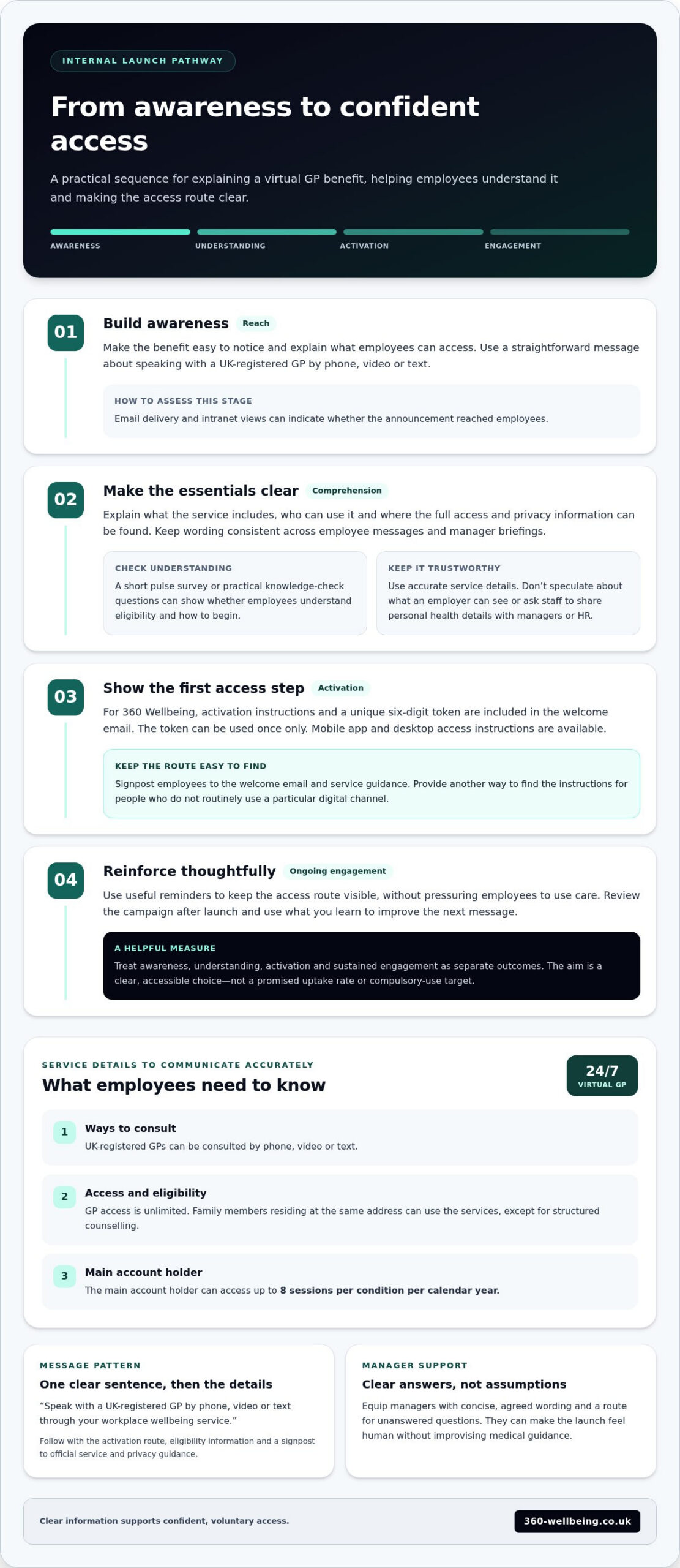
Decide which outcome you need first. Awareness means employees have encountered the announcement; comprehension means they can explain the essentials; activation means they’ve followed the access steps. Sustained engagement is a later goal, supported by useful reminders rather than pressure to use care.
Measure these outcomes separately. Email delivery or intranet views can indicate reach, while a short pulse survey or practical knowledge-check questions can show whether staff understand eligibility and how to begin. Set a review point after launch, then use what you learn to improve the next message. Avoid promising a particular uptake rate: the aim is to offer a clear, accessible choice, not set a target that could make healthcare feel compulsory.
Recognise the questions employees may bring
People have different levels of confidence with apps, online services and workplace benefits. Make the access route easy to follow, and provide another way to find the instructions for employees who don’t routinely use a particular digital channel.
Address eligibility and privacy directly, using accurate service information. Explain what the benefit includes and where employees can find further details, but don’t speculate about what an employer can see. Staff should not have to share personal health details with managers or HR to demonstrate interest.
Managers can make a launch feel human, but they need concise, agreed wording rather than assumptions or improvised medical guidance. Give them a short set of accurate answers and a route for directing unanswered questions to the right information. Keep the tone reassuring: the service is there for employees to consider when it’s useful to them, not a prompt to seek care unnecessarily.
This is the practical foundation for how to market a virtual GP service internally: define what success means at each stage, make the next step understandable and build trust through accurate, respectful communication. Then choose channels that suit how your workforce actually receives information.
Build a clear, trustworthy message about your virtual GP service
A useful employee message starts with the practical benefit, not a long feature list. Say what staff can do, explain who can access it, then give a straightforward next step. For example: “Speak with a UK-registered GP by phone, video or text through your workplace wellbeing service.” This explains what access looks like without suggesting a particular diagnosis, treatment or outcome.
Keep the first explanation focused, but make the full instructions easy to find. Explain that GP access is unlimited, then direct employees to the activation guidance in their welcome email. For 360 Wellbeing, employees use the unique six-digit token in that email to activate access. Point to the mobile app or desktop access instructions, and give employees a clear route for practical questions.
Create a short message employees can remember
Use a simple message hierarchy: one sentence on the benefit, a few lines on how to begin, then a link or signpost to the official instructions. Keep the core wording consistent across email, onboarding materials and manager briefings, so employees aren’t left comparing conflicting versions. A clear, repeatable message is more useful than promotional language that leaves people wondering what to do next.
Build trust through accuracy and reassurance
Be precise about what the service offers. Explain that employees can consult UK-registered GPs by phone, video or text, with unlimited access. Family members residing at the same address can use the services, except for structured counselling. The main account holder can access up to 8 sessions per condition per calendar year. Avoid promising that a consultation will lead to a diagnosis, prescription or particular health result.
Handle privacy with equal care. Health questions are personal, so don’t make broad assurances such as “your employer will never see anything” unless that wording is supported by the service’s documented privacy information. Instead, direct employees to the relevant privacy details and explain only what you can verify. Managers should not invite staff to disclose health concerns to prove the benefit is useful.
- Say: “You can speak with a UK-registered GP by phone, video or text.”
- Explain: “Your welcome email includes your unique six-digit token and activation instructions. The token can be used once only.”
- Signpost: “Use the service guidance for access and privacy information, or follow the stated support route with practical questions.”
Keep the GP message central while showing how it fits within a broader wellbeing offer. If employees ask about other practical support, a separate resource on financial support for employees can provide context without crowding the GP announcement. For a wider view of connected support, explore 360 Wellbeing’s employee wellbeing support. This clarity is at the heart of how to market a virtual GP service internally: give employees accurate information, respect their privacy and make the next step easy to find.
Choose the right channels and messengers for employee awareness
A message only reaches people who can access the channel it’s sent through. Match the format to employees’ working patterns, then make sure every route leads to the same reliable written instructions. Email may suit a workforce that regularly checks its inbox, while shift-based or desk-free teams may need a verbal introduction and a way to access details during their normal work routine.
Give each channel a clear purpose. The table below can help you plan a mix without sending the same long announcement everywhere.
| Channel | Best use | Practical consideration |
|---|---|---|
| Announce the service and point to instructions | Keep the message brief and make the next step easy to find | |
| Intranet | Host searchable, detailed information employees can revisit | Use a clear page title and keep the guidance current |
| Team meetings | Introduce the benefit and answer general questions | Allow time for questions, without asking anyone to share health details |
| Onboarding | Explain access to new starters as part of benefits information | Provide the same written instructions used in the launch |
| Manager briefings | Help team leaders share consistent facts | Give managers approved wording and a route for questions they can’t answer |
Match the channel to how employees work
Remote and hybrid staff may find email and intranet guidance convenient, while desk-based teams might also see a short update during an existing meeting. For shift-based employees, consider a team briefing and a written notice or resource they can return to, rather than relying on workplace email alone. Treat these as planning options, not assumptions: use what you know about how staff actually receive work information.
Where practical, make the instructions available in more than one format. A short spoken introduction can raise awareness, but it shouldn’t replace written steps. Keep those steps easy to locate and revisit, use plain language, and ensure the digital information works on the devices employees commonly use. Consistent signposting helps staff find the details later, when they’re ready to act.
Equip managers and trusted internal messengers
Managers can make a benefit feel relevant by introducing it in familiar team settings, but they shouldn’t have to interpret service details themselves. Provide a concise briefing, approved key messages and a named route for escalating questions. Ask leaders to share the information consistently and make clear that deciding whether to use the service is personal.
Set clear boundaries for conversations. Managers should not request personal health information or ask employees to disclose whether they’ve used the service. If a question involves privacy or individual eligibility, direct staff to the written guidance or appropriate support contact rather than guessing.
Across every channel, preserve the core facts and adapt only the length, format and timing. This is a practical part of how to market a virtual GP service internally: make information easy to encounter, revisit and engage with, whether an employee first hears about it in an inbox, an induction or a team conversation.
Launch, reinforce and measure your internal virtual GP campaign
A thoughtful launch is a sequence, not a single announcement. Plan the key messages and access instructions, introduce the benefit through channels employees use, then review what people understood and where they need more clarity. This gives HR a practical way to improve communication without treating service use as a target or making assumptions about individual health.
Plan a simple launch sequence
Before launch, prepare approved copy, manager guidance, answers to common questions and accessible written activation instructions. Choose one information hub as the source of truth, so reminders and conversations point employees to the same details.
Follow a clear order:
- Prepare: Check the wording, instructions and support route, and brief managers on the facts they can share.
- Announce: Introduce the benefit through the primary channels your workforce uses, with a direct link or signpost to the information hub.
- Explain access: Follow up with practical guidance showing where to find activation steps and whom to contact with questions.
- Remind: Address questions that have come up, such as where to find the instructions or what access involves. Avoid simply repeating promotional claims.
- Review: After employees have had time to see and consider the information, gather feedback and assess available communication measures.
Make reminders useful rather than louder. If people are unsure where to begin, clarify the route to written instructions. If questions show that eligibility or privacy information is hard to find, make it easier to locate. Keep the tone calm and voluntary throughout.
Review effectiveness without overclaiming
Use measures that show how well communication worked, not assumptions about employee health. Available indicators might include email delivery, intranet visits, attendance at an information session, the kinds of questions HR receives and activation figures if these are available to the employer.
Interpret each measure carefully. A delivered message doesn’t show that it was understood, and an activation count alone won’t explain why employees chose to use or not use a service. Ask for brief, voluntary feedback: Was the information clear? Could employees find the access instructions? What would make the next explanation easier to follow?
Review findings in aggregate and handle information appropriately. Don’t try to identify employees from usage patterns, infer someone’s health status or invite managers to monitor individual participation. Keep campaign reporting focused on reach, clarity and engagement. Likewise, don’t claim the service reduced absence or improved productivity unless you have suitable evidence to support that conclusion.
A measured approach helps employers learn and refine their communication over time. To see how virtual GP access can sit within a wider employee wellbeing offer, explore 360 Wellbeing. This is a practical way to approach how to market a virtual GP service internally: give employees clear information, listen to their questions and use what you learn to make the next step easier.
Turn awareness into confident access with 360 Wellbeing
A clear campaign should end with an action employees can picture taking. With 360 Wellbeing, the 24/7 Virtual GP sits within an employee wellbeing subscription that also includes mental health support, physiotherapy and life coaching. Explaining this wider context helps staff understand GP access as one part of a broader approach to wellbeing, while keeping practical access steps front and centre.
Explain what employees can access
Employees can access UK-registered GPs by phone, video or text, with unlimited GP access. Family members residing at the same address can also use the services, except for structured counselling. The main account holder can access up to 8 sessions per condition per calendar year. State these details plainly in launch materials so employees understand who can use the service and how they can connect with a GP.
Keep the boundaries clear and avoid suggesting that the service guarantees a particular medical outcome. If you describe other support within the subscription, explain its access and eligibility separately rather than implying that every element works in the same way.
Make activation easy to communicate
Employees receive a welcome email containing their unique six-digit token and activation instructions. They can access the service through the mobile app, available on Google Play and the Apple App Store, or use the progressive web app on a desktop or laptop. The token can be used once only, so employees must not share it or expect to reuse it.
Give staff a short set of steps they can follow at their own pace:
- Find the welcome email and its unique six-digit token.
- Follow the activation instructions using the mobile app or desktop progressive web app.
- Keep the token private and use it only once.
- Once activated, choose phone, video or text when accessing a UK-registered GP.
For employers, onboarding is also straightforward to explain: signing up takes under one minute, and the team contacts employers within one working day. Keep this employer process distinct from employee activation, which begins with the welcome email. That distinction helps prevent confusion about who receives the token and what action each person needs to take.
When deciding how to market a virtual GP service internally, make the route from announcement to access visible in every launch message. A concise employee-facing line could say: “Find your welcome email, use your unique token once, then follow the instructions in the app or on desktop.” Pair it with a clear route to written guidance so employees can revisit the steps when they need them.
For employers considering this approach as part of a wider wellbeing offer, explore 360 Wellbeing and its employee support options.
Make employee access part of your ongoing wellbeing conversation
Your internal campaign doesn’t have to end when the launch messages do. Treat employee questions and feedback as a guide for making future communications clearer, more inclusive and easier to act on. A well-supported benefit should feel like an available resource, not an instruction to seek care or disclose personal information.
That’s the principle behind how to market a virtual GP service internally: help people understand their options, then leave the choice of whether and when to use them in their hands. 360 Wellbeing brings unlimited on-demand access to UK-registered GPs by phone, video or text together with mental health support, physiotherapy, coaching and other wellbeing services.
If you’re considering how a broader employee wellbeing offer could fit into your organisation, take a closer look at 360 Wellbeing. A clear, thoughtful approach can help employees feel more confident about the support available to them and give your organisation a positive foundation for wellbeing conversations ahead.
Frequently Asked Questions
How do you announce a virtual GP service to employees?
Announce it with a short, practical message that tells staff what the service is for and where to find the full guidance. To make how to market a virtual GP service internally easier to apply, draft a version for a staff bulletin, then adapt it for the organisation’s main communication channel. For example, link the announcement to a benefits page employees can bookmark, and make sure new starters can find the same information later.
What should an internal virtual GP launch email include?
Keep the email centred on the employee benefit, how to access it and where to get reliable details. Use a descriptive subject line, a brief explanation of the consultation routes and one prominent link to the central information page. Include the right contact route for practical questions. Before sending, check that the linked page is current and that the email doesn’t make unsupported promises about medical outcomes or employer access to personal information.
How can employers address privacy concerns about a virtual GP service?
Address privacy questions openly, but share only information supported by the service’s privacy materials and documented reporting arrangements. If an employee asks what their employer can see, don’t guess or offer blanket assurances. Point them to the relevant privacy information or appropriate support contact for a precise answer. Managers can reinforce trust by explaining access without asking staff to disclose symptoms, appointments or whether they’ve used the service.
How often should employers promote a virtual GP benefit internally?
Begin with a launch announcement, then use occasional reminders that add useful information. For instance, a follow-up could answer a common question or point employees to instructions they may have missed. Timing depends on how your workforce receives updates and what feedback reveals. Include the benefit in relevant onboarding and benefits communications too, so staff can rediscover the information without receiving repetitive messages.
How can a company promote a virtual GP service to shift workers?
Make the information available beyond live meetings and work email. Share a concise written notice in a staff-accessible location, and keep a fuller version in a resource employees can revisit across shifts. Brief line managers with consistent wording so the explanation doesn’t change between teams. Include a clear route for questions and ensure employees can access written instructions without having to discuss a personal health concern with their manager.
How can employers measure whether internal marketing is working?
Assess communication performance using measures your organisation can access, such as message delivery, page visits, employee questions and available activation indicators. Pair these with short feedback asking whether staff found the information clear and what would make it easier to understand. Review results in aggregate and avoid trying to identify individual users or infer health status. Don’t attribute changes in absence, productivity or health to the campaign unless suitable evidence supports that conclusion.